Blog
How I freed more than 12GB in my Hotmail account with Jev (and skipped yet another subscription)
I freed more than 12GB in Hotmail with Jev: I classified about 70,000 emails, reviewed the uncertain ones, and confirmed permanent deletion without paying for another storage plan.

In an era of endless subscriptions — streaming, cloud storage, productivity tools — hitting a storage limit often means yet another monthly fee. I had that problem with my Hotmail account: it was out of storage and held about 70,000 emails. Some were promotions, newsletters, automated notices, and messages that no longer mattered. Others were receipts, login details, and conversations I still needed. Deleting everything by sender or by age was too risky. Reading every message by hand would never end. Instead of paying for more storage, I decided to reclaim space.
That is why I built Mail Organizer: a local app for deciding which emails I could delete, reviewing the uncertain cases, and running the deletion from Outlook. What turned a blind cleanup into a useful review was Jev, the System One model from TypeSafe.
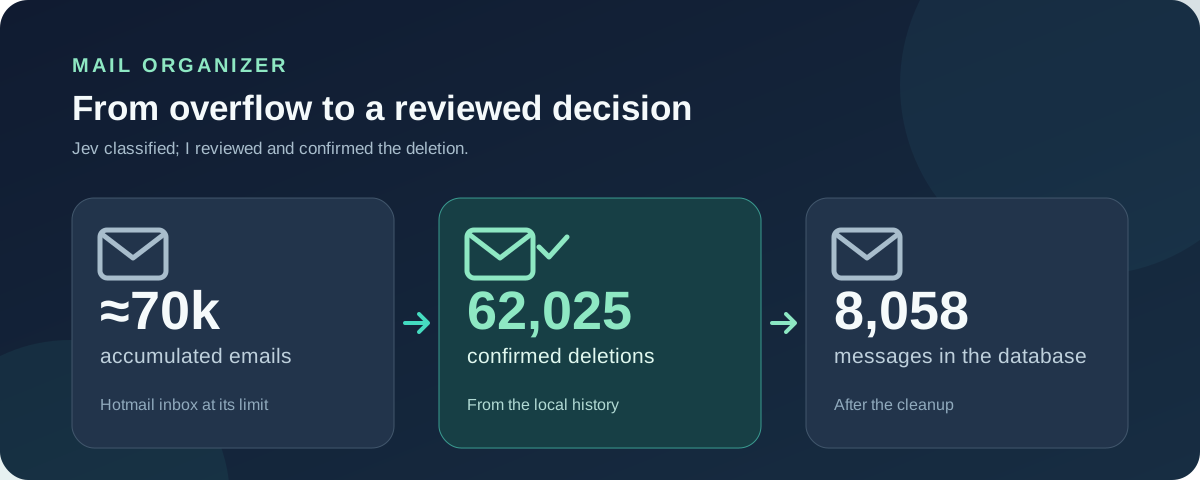
The goal was not for an AI to empty my inbox. It was to turn thousands of repetitive decisions into a list I could understand and approve.
The stack I chose
I wanted the app to run on my computer and for secrets never to reach the browser. I chose a single Next.js 15 project with React 19, TypeScript, and Tailwind CSS for the interface; its API routes run the server logic. That let me build the review panel and the cleanup jobs in the same application, without deploying a separate service.
| Piece | Technology | Its job in the project |
|---|---|---|
| Interface and server | Next.js App Router, React, TypeScript, and Tailwind | Show the guided flow and run the API routes in Node.js. |
| Mail access | Microsoft Graph and @azure/msal-node |
Sign in, query messages, and request deletion in Outlook. |
| AI judgments | Jev through @typesafe-ai/sdk |
Evaluate each email and return structured probabilities. |
| Persistence | SQLite with better-sqlite3 |
Store metadata, judgments, in-progress jobs, and the deletion history. |
The important split is inside that one process: the browser displays data and collects my decisions; the API routes hold the Microsoft session and the TypeSafe key, call external services, and write to SQLite. Secrets live in .env.local and are read only on the server.
I also orchestrated agents in Cursor and OpenCode with the models GPT-6 Astra, GPT-6 Sol, Opus 5.5, Grok 4.7, and Muse Spark 1.3.
From a full inbox to a list I could review
I split the work into date ranges. The app connects to Outlook through Microsoft Graph and stores in a local SQLite database only what it needs to classify a message: sender, subject, a short preview, date, folder, and a few signals such as whether the email has attachments. It does not download or store the full body or the attachments. When I want to read a message, the app asks Outlook for the body at that moment.
- React panel Sends actions to the Next.js API routes.
- API routes Use MSAL and the local session to talk to Microsoft Graph.
- Microsoft Graph Returns date-range metadata; the API stores it in SQLite.
- SQLite → Jev Each query sends one email; Jev returns typed judgments that go back into the database.
- Protection policy Filters the lists I see in the panel. On confirmation, the API asks Graph for a permanent delete.
Saving those judgments in SQLite mattered. I could stop and resume without classifying the same messages twice. I could also change the decision thresholds and rebuild the lists without asking Jev again.
Authentication and sync
For a personal Hotmail account I used OAuth with MSAL, a public client, and the Authorization Code + PKCE flow. The app requests delegated mail permissions, checks that the connected account is the one I configured, and keeps the session on the server. It never asks for my password and never uses a client secret in the browser. That logic lives in auth.ts.
Every sync requires dates. Internally I convert the inclusive dates from the UI into a [from, to) interval and query Microsoft Graph page by page. I store a cursor and progress in SQLite so I can continue if a session stops. When I sync again, I update the metadata without erasing the fact that Jev already classified a message. That sits in sync.ts and messages.ts.
SQLite has another job: Outlook does not know my junk_probability field, so I could not filter or group emails by that value directly in Graph. In the local database I separated messages (metadata), judgments (Jev answers), scores (policy result), jobs (progress), and deletion_log (audit). If I change a threshold, I recompute scores from judgments without paying for another classification.
Long-running jobs and a UI that explains progress
Syncing, classifying, and deleting thousands of emails takes longer than a normal web request. The API routes start background jobs inside the local process and return control to the panel. jobs stores the range, cursor, and counters; each classified email is persisted as soon as it finishes. If the server restarts, the app recognizes the interrupted job and I can continue without starting over.
I organized the interface into five steps — connect, choose dates, sync, classify, and review — and added an activity log for pages received, errors, and retries. That solved a design problem as important as the classification itself: during a long operation I needed to know whether the system was advancing, waiting on a quota, or waiting for me.
What I asked Jev
A rule like “if it says newsletter, delete it” cannot tell useless advertising from an email I still need. Jev therefore scores each message on its own, with ten structured questions. The main one is, in essence: “Could I permanently delete this email without losing anything I still need?” The answer is a Noul, TypeSafe’s yes-or-no question, which returns a probability between 0 and 1. That probability feeds the list of disposable messages.
This fragment from the classifier (classify.ts) shows the core idea: I send one email’s context together with the ten questions and read a typed response, instead of parsing free text.
const response = await typeSafe().systemOne({
  state: stateFor(message, folders, evaluatedAt),
  model: "jev-latest",
  questions: MAIL_QUESTIONS,
});

const probability = response.answers.is_disposable.noul;
The other questions add context and protection: whether it looks like marketing or an automated notice, whether a person is waiting for a reply, whether it contains credentials, whether it is a financial or legal record, and whether its usefulness has already expired. For time-sensitive cases, Jev receives both the email date and the evaluation date. A temporary code from years ago and an invoice from the same day should not be treated the same way.
The app makes one Jev request per email, but includes all ten questions in that same request. Nine are Noul questions and the tenth scores how painful it would be to lose the message on a five-level scale. I capped classification at 15 concurrent requests and 900 starts per minute; transient errors retry, and messages that keep failing stay marked so I can process them again. Patterns like no-reply only move a message earlier in the queue: they never declare it junk on their own.
| Judgment | What I did with it |
|---|---|
| 75% or higher chance it was disposable | It showed up as deletable, ready for my review. |
| 40% up to, but not including, 75% | It went to review: the decision needed more context. |
| Under 40% | It stayed in keep. |
That percentage is the model’s judgment, not a guarantee that deletion is safe. I added separate brakes: an email with strong signs of credentials, financial or legal documents, or a personal conversation moves to keep even if Jev calls it disposable. I can also protect senders with an allowlist. Before deleting a large batch, the app can label a sample of up to one hundred emails and compare my decisions with Jev’s, so I can catch false positives.
In code, the policy (policy.ts) looks roughly like this (shortened):
const probability = judgment.is_disposable;
const protectedMail =
  judgment.contains_access_credentials > 0.60 ||
  judgment.contains_financial_or_legal > 0.60 ||
  judgment.is_addressed_personally > 0.70 ||
  senderRule === "always_keep";

const bucket = protectedMail ? "keep"
  : probability >= 0.75 ? "deletable"
  : probability >= 0.40 ? "review"
  : "keep";
That split was deliberate: Jev provides the judgments; a deterministic function applies my thresholds and protections. I can change the policy without changing the model answers, and I can explain why each email landed in each list.
The step that actually freed space
Classification does not recover storage by itself. I inspected the lists first, grouped emails by sender, and reviewed the uncertain messages. To delete, the app shows the protection blocks and requires me to type the exact number of selected emails. Only then does it send Microsoft Graph a permanent delete. Moving messages to Deleted Items was not enough for the quota problem.
If you want to build something similar, the key operation is permanentDelete: Microsoft Graph exposes it through POST /me/messages/{id}/permanentDelete and, for a personal account, requires the delegated Mail.ReadWrite permission. The documentation explains that the message moves to the Purges folder under Recoverable Items. That does not mean it is physically erased immediately: retention policies may still apply.
Before calling Graph I write a pending row for each message in deletion_log. Then I send permanentDelete in batches of up to 20 operations, using immutable identifiers so a folder move does not change the reference to the email. Only a successful response marks the record as deleted; a 404 or an uncertain response keeps the case for review or retry. That flow lives in deletion.ts.
Another limit showed up during the bulk cleanup: Microsoft throttles requests. Deletion slowed down once I hit that quota. I added a preventive budget of 9,000 operations per ten minutes and a shared wait when Microsoft responds with Retry-After. The process retries only the items that failed, without repeating deletions already confirmed. The panel shows when it is waiting on the quota, and the log keeps each email’s result; a network error is not reported as a successful delete.
Recorded result: on September 22, 2026, the local history marked 62,025 distinct emails as deleted and zero pending or failed. The local database still held 8,058 messages. Jev used 100,737,845 tokens, at a cost of $3.6393.
What started as an inbox I could not sort became a manageable flow: limit the dates, ask Jev for clear judgments, protect what matters, review, and confirm the deletion. Jev saved me the repetitive classification. The rules and the human review kept the final decision in my hands.
Further reading
- What Jev is and how it works, in the official TypeSafe docs.
- Noul, Score, and Choice, the structured answers I used to build the classification.
- System One API reference, for the query contract.
- Permanently deleting messages (Microsoft Graph), official guide with the permissions and the Purges folder.